Category Archives: How to Make the Most of MxToolbox

Alert! Alert! We have new (Alert) Notifications

With email configuration settings becoming more critical to email delivery and Inbox Providers regularly updating email delivery policies, emergent changes to delivery patterns can have a significant impact on your business. MxToolbox has always provided a Weekly Summary of your email delivery, now we’re expanding our Alerts and Notifications with highly granular controls. If you’ve ever felt like you might miss a status or account alert, or you were tired of getting extraneous notifications, you’ll love our new Notifications system.

MxToolbox Centralized Notifications

Your current settings, subscribed users, and history of all notifications sent regarding your MxToolbox account are all consolidated in a single dashboard view. You can manage Notifications by User or by Type, and view Notifications History for the entire account. You can quickly turn on/off different email notifications and monitor who receives them. 

Recently, we introduced two types of Data-Driven alerts, but as we add more notifications you’ll be able to:

  • Setup specific notifications for individual members of your tech team based on their specialties.
  • Limit billing notifications to you billing contacts.
  • Remove unnecessary notifications, alerts or reports from disinterested users.

Using MxToolbox Notifications

To begin selecting which notifications you would like to receive in your inbox, simply click the “Notifications” header toward the bottom of your Delivery Center interface:

At the top of this page, there are three Notifications categories:

Each category is editable and allows you to participate in different aspects of MxToolbox Notifications.

Notifications by User

The Notifications by User option lets you choose which parts of the MxToolbox experience you want selected users/team members to receive scheduled alerts for. You can use the none option to decline alerts by category, or you can select the all button if you prefer to receive every available notification via email.
The Delivery Center, Account, Summaries, and Other sections are also editable, so you can pick and choose specific notifications that users will receive alerts for in the future. Be sure to click on the helpful info and link icons (shown below) in each category for more insight.
Note: Some notifications cannot be disabled because they are required for supporting your account.

Notifications by Type

This Notifications section organizes them by type. You can easily set up multiple team members to receive specific emails or view who is currently allowed to receive them. Plus, you can quickly subscribe/unsubscribe certain teammates to various alerts.

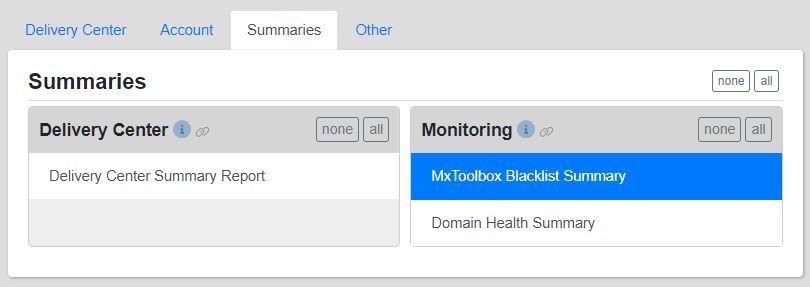
On the left side of the interface, each tab (Delivery Center, Account, Summaries, and Other) lists the corresponding categories of those four headers.

For example, the Summaries category shows the Delivery Center and Monitoring types. Under each, their specific notifications are shown.
Assigned Users

On the right side of the page, the Assigned Users for every notification are provided. If you want to see or change who receives the various types of notification, simply select a specific alert and update the user’s access by clicking their corresponding button in the Assigned Users section. Green means that teammate will receive any notifications assigned to them.

Notifications History

The Notifications History page provides a log of all notifications sent to your chosen users, as well as any setting changes that affect notifications. For example, if you want to confirm that an MxToolbox Blacklist Summary report or a Monitoring Alert email was sent to a team member selected to receive those notifications, this interface provides that information. All updates and changes made are conveniently shown here.

Using the shown drop-down menus (Type, Domain, By, For, and Result), you can adjust the data view. These options essentially work as filters.

The table lists different characteristics of every notification for review, including: Date, Topic, Type, Domain, By, For, and Result. They are sortable to give you the desired insight.

Questions?

If you need help setting up any MxToolbox Notifications, our expert Support Team is ready to get you and your colleagues situated. The “Help” tab for each category is also a great reference to utilize. Stay informed and start receiving important MxToolbox alerts and communications in your inboxes today!

Our Commitment to Free Tools

MxToolbox started out as a simple set of free tools for IT and Email administrators. Most of our customers used our original DNS, MX and Blacklist lookups to verify their website and email setup and understand why email wasn’t going through. Since those days, we’ve committed to continually adding useful free tools to help IT and Email professionals with their daily tasks. From A record (and AAAA record) lookups to Whois Lookup, we have you covered (and if there is a tool we’re missing, we encourage you to let us know).

Not only do we have a comprehensive list of tools, we continue to expand it: when we find a tool we need, we add it to the list. For example, we recently added the:

MTA-STS Lookup: This test checks a domain or hostname for an MTA-Strict Transport Security (MTA-STS) DNS TXT record and also for a valid MTA-STS policy.

Organize your MxToolbox Tools

We understand that not all our tools are for everyone, and that you use different groups of tools for different tasks: email, security, setup, etc. For your convenience, we organized our tools into categories:

  • All Tools: Every available free tool is housed under this tab.
  • Email: For email problems, this tab is your best bet
  • Network: To address potential network issues, try these tools.
  • Website: If you have any website queries, this tab provides answers.
  • DNS: You can find all tools related to DNS here.
  • New: This tab shows the most recent additions to our expanding toolbox.
  • My Favorite Tools: Your customized favorites list. For more information, see the corresponding section below. Learn how to setup your favorites

For a complete list of our free tools, click here. We always enjoy questions/feedback, so let us know about your MxToolbox tools experience. Be sure to use our tools to improve your email delivery rates!

Google and Yahoo are upping their game in 2024!

In the on-going battle against spam, Google and Yahoo have announced new standards for 2024 that will help protect their inboxes and curtail spam intrusions. This is great news for legitimate email senders who abide by email best practices as we expect other Inbox Providers and email services to follow their lead. However, your business may need to adapt to these new standards or risk missing the Inbox.

Google and Yahoo to Require SPF, DKIM, and DMARC

For Google, if your business sends more than 5,000 messages to Gmail addresses, you must adopt SPF, DKIM, and DMARC by February 2024. Yahoo will apply the same trio of requirements to “bulk senders” in the first quarter of 2024, though they have not defined what constitutes a bulk sender.

The new email requirements include both SPF and DKIM records for authenticating email-sending domains, a DMARC record for the domain, and a “From” header that matches either the SPF or DMARC record, known as “alignment.” In addition, marketers must keep spam rates below 0.3% and provide the ability to unsubscribe with a single click if the recipient chooses.

What does this mean for your business?

Google’s and Yahoo’s requirements are a critical move to reinforce your company’s email best practices. With the two largest email providers taking major steps to secure inboxes, more Inbox Providers will adopt similar DMARC policies in the future. Getting prepared will be key.

If your company has already enabled SPF, DKIM and DMARC, you get a boost. Your messages will have to compete with fewer poorly configured emails or spam messages. Your email has protection against impersonation through better authentication and, with DMARC, you are able to see SPF and DKIM configuration issues that would put your email delivery at risk and detect spammers attempting to use your domain for fraud of phishing. If you have not configured SPF, DKIM and DMARC, you have a short window to get prepared. Regardless of your SPF, DKIM and DMARC configuration, however, the requirement to maintain a low rate of being marked as “spam” could really hurt you if you are purchasing email lists.

How Can MxToolbox Help?

With these upcoming changes to Google and Yahoo, now is the perfect time to use our various tools and products to improve your email deliverability!

Since DMARC will soon be a requirement for those providers, MxToolbox Delivery Center will help your sending domain achieve the best possible email delivery rates, including managing your DMARC setup. In addition, our Inbox Placement feature will tell you if your campaigns are being sent to the Spam/Junk folders or actually making it to inboxes, as well as which Inbox Provider(s) you are having trouble sending to.

MxToolbox is the Expert on email delivery. We offer a wide range of free and subscribed options, so be proactive now and take advantage of them before these new 2024 guidelines are applied to your outgoing newsletters and marketing campaigns.

Uncover your Email Problems with our Email Delivery Tools

Email delivery is probably the most important connection between Marketing Art and Information Technology. Whether your email is driving sales, connecting to vendors or simply for internal communications, an email that fails to make the Inbox is a failure of communications that can cost your business.

Email Health

A tool that is often overlooked yet is highly beneficial for your email deliverability is our Email Health Report. This tool executes hundreds of domain/email/network setup tests to ensure all of your systems are online and performing optimally. The report returns results for your domain and highlights critical problem areas that need to be resolved.

  • Get full visibility of your email’s health status in one concise report.
  • Identify every problem facing your email, including blacklist, mail server, web server, and DNS issues.
  • Be proactive about email health and detect any current email issues before they cause email failures.

Major MxToolbox Email Delivery Tools

Email delivery is a constantly changing technology landscape. Inbox providers change policies and technologies to protect their users and spammers change methods to get their unwanted messages read. MxToolbox is the Expert in Email Delivery and provides tools to better help you understand your legitimate email delivery issues.

  • Blocklist (IP or Host): The blocklist check tests a mail server’s IP address against over 100 DNS-based email blocklists.
  • DMARC Delivery Report: This tool creates comprehensive DMARC reports, providing insight into potential issues and any needed changes to your DMARC policy.
  • DMARC Report Analyzer: This option makes DMARC Aggregate XML reports human readable by parsing and aggregating them by IP address into helpful reports.
  • Email Bounceback Analyzer: This analyzer returns details regarding the bounce error, such as the inbox provider, why the message bounced, and additional information to help remedy the issue.
  • MTA-STS Lookup: This test checks a domain or hostname for an MTA-Strict Transport Security (MTA-STS) DNS TXT record and also for a valid MTA-STS policy.
  • Spam Analyzer: This tool uses the SpamAssassin software to analyze your message and return a spam score from over 711 various criteria.

Inbox Placement Analysis

Our Inbox Placement tool analyzes your campaign emails before you send them. We determine if the email will make the inbox at major Inbox Providers like Google, Yahoo! and Outlook.com/Office365. We also analyze important technology and soft factors like:

  • DMARC Compliance
  • Broken or copious links
  • Wordiness
  • Broken or too many images
  • Spammy verbiage
  • Other indicators of spam

Inbox Placement is a feature of all paid Delivery Center plans, so you can test your marketing emails and improve your DMARC compliance all in one place.

Does DMARC and email deliverability seem too complicated?

MxToolbox Experts are here with a Managed Services approach to your email configuration issues.

Do you know what you don’t know about your email?

As a marketer, I typically know if a prospect opens my email, clicks on a link or buys a product.  All 3rd party email marketing tools provide this information.  But, what happened before the Open?  

Did the email make it to the Inbox?  

Did it get delivered to the Spam or Junk folder?

Does my language, text, grammar or content seem spammy?

Did my email configuration affect my open rates?  

Are my 3rd party senders blacklisted or otherwise hurting me?

Are my prospects complaining about me to their Inbox Providers?

There are many layers protecting inboxes from spam and undesired email. Your business needs a strategy to ensure that your email passes through each layer to reach the recipient.   Your open rates will thank you. 

What can you measure?

Actually, with the right tools, you can get answers to all these questions.  Inbox Providers like Google, Yahoo!, and Office365 wants their inboxes to show relevant email so they provide data via DMARC Reports and Feedback Loops to help legitimate businesses.  Neglecting these key resources is equivalent to driving in traffic without a GPS: you don’t know what traffic incidents or twists and turns are waiting for you.

How does MxToolbox Help?

Inbox Placement

Will your email make the Inbox, Junk folder, Spam folder or fail to get delivered?

Inbox Placement allows you to test prospective campaigns with the most common Inbox Providers – Google, Yahoo! and Office365.com.  We’ll tell you if the email is delivered and to what folder.  We’ll even analyze the contents of your email to give you MxTips(™) to improve your inbox placement.  Some simple tweaks to verbiage or construction can often improve Inbox Placement tremendously.  

DMARC Reporting

Is your email configuration affecting your email delivery?  Are all your emails SPF, DKIM and DMARC compliant?  

To optimize your email delivery, and get your message heard, you need to constantly analyze and manage your email configuration.  Inbox Providers will send out DMARC digests giving you data on your SPF, DKIM and DMARC pass rates.  With this data, you can determine if you have senders missing from your SPF records, DKIM issues, or potential risks from fraud and spoofing.  MxToolbox Delivery Center gives you all the tools you need to take DMARC data and turn it into actionable email delivery insight.

Feedback Loops

Did a recipient complain about receiving your email to their Inbox Provider?  Did the recipient mark it as unsubscribed with the Inbox Provider?  Was the email address invalid or shut down?

Many Inbox Providers offer feedback loops or complaint mechanisms to validated emailers.  Once configured, you can get information on email addresses and campaigns and how recipients view your emails.  Analyze your recipient complaints, remove complainers, unsubscribers, and closed email boxes to massively improve your email delivery. MxToolbox Delivery Center allows you to configure and aggregate complaints across Inbox Providers to get insight into how your campaigns are perceived by recipients.

Adaptive Blacklist Monitoring

Are your 3rd party ESPs blacklisted and harming your email delivery?

Due to the nature of their business, 3rd party emailers will always have a few IP addresses blacklisted and it is probable that some portion of your email will be sent from a blacklisted IP address.  This only becomes an issue when a significant amount of your email from that provider is sent from blacklisted IP addresses.  MxToolbox Delivery Center included Adaptive Blacklist monitoring to detect, via DMARC, the IP addresses being used to send your email and analyze the blacklist status of the IP when the email was sent.  You’ll know if your 3rd party ESP is helping or harming your email delivery.  

It’s time to adopt MTA-STS

Inbox Providers like Google, Yahoo! and Outlook.com are in a constant arms race trying to protect their users from spammers, spoofers and irrelevant content. Since the late 90’s dozens of new technologies have been proposed and adopted, including: Blacklists, TLS Encryption, SPF, DKIM, DMARC, BIMI and, now, MTA-STS. With the continued progression of MTA-STS, it is now time for all domains to adopt the technology to secure inbound email and reduce the threat of spam.

What is MTA-STS?

MTA-STS is an update to TLS Encryption that allows an Inbox Provider to specify a list of secure servers to receive email and mandates a secure TLS connection to these servers. Insecure connections will not be accepted. This corrects a few of the short-comings of TLS alone: Expired TLS Security Certificates, Man-in-the-Middle Attacks and attacks that downgrade to no encryption.

How does MTA-STS Work?

When a sender wants to connect to an inbox provider or domain’s email servers to deliver email, they first query the MTA-STS DNS entry which contains the location of a policy file. The policy file is accessed via HTTPs and contains information about the correct servers to use, which must match the MX records exactly, the TLS encryption requirements, the MTA-STS policy mode and the maximum length to cache this information. Senders then encrypt communication with the servers and transmit the email.

Since the sender is required to verify the connection and it is encrypted to known servers, the sender has a slightly higher level of trust. Any sender that fails this mini test can be considered a threat.

What does MxToolbox recommend?

MxToolbox recommends that all companies setup MTA-STS for their receiving domains to inform senders that their email servers and providers accept secure message delivery using SMTP over TLS and also require that email should not be delivered using an insecure SMTP connection. When MTA-STS is enabled for your receiving domain, it requests external servers to send messages to your domain only when the SMTP connection is authenticated with a valid public certificate AND encrypted with TLS 1.2 or higher. This is a higher level of security for incoming email and should reduce spam to your domain.

In addition, you should ensure that all your domain’s email senders support MTA-STS. This includes your email server software, email marketing, and any other potential email senders: CRM, Order Management, Support, etc. Once you select a provider’s MTA-STS policy, messages sent from your domain to external servers will also comply with the standard and improve delivery.

Test Your MTA-SLS setup with MxToolbox

To help all our users get a head start with MTA-STS, we’ve created a free lookup tool as part of our SuperTool. Check your MTA-STS policy setup as well as any email sender!

The Flavors of Successfully Delivered Email

Email delivery is a complicated thing. There are multiple layers of technology protecting an inbox at modern inbox providers like Google, Yahoo! and Outlook.com. For example:

  • Blacklists are used to identify IP addresses that have spammed or otherwise should not be trusted
  • SPF identifies legitimate sending IP addresses for a domain
  • DKIM allows a domain to sign email to ensure the integrity of the email
  • DMARC enables a sending domain to get feedback from Inbox Providers on SPF and DKIM compliance
  • Inbox Providers maintain internal Unsubscribe Lists
  • Inbox Providers maintains internal Spam Lists
  • Inbox Providers run proprietary Spam Content Analyses
  • Inbox Providers monitor engagement with emails from a domain

Email Delivery Standards

Technically Delivered

In the email world, a message is considered successfully delivered when the recipient can access the email. The email could be delivered to any subfolder for example:

  • Junk
  • Spam
  • Quarantine
  • Bulk
  • Promotions
  • Customer configured Filter or Subfolder

While this does not seem optimal to the recipient or sender, the email is accessible, just not in the main Inbox.

Undelivered email is completely inaccessible to the recipient. An email could be undelivered for multiple reasons, depending on how the Inbox Provider’s algorithms work:

  • The sending IP was blacklisted so the system declared the email Spam and rejected it.
  • The Sending IP was not listed in the Sending Domain’s SPF record. This is either a misconfiguration or a sign of a deliberate spoofing attempt.
  • The DKIM signature does not align with the Sender’s signature.
  • The recipient mailbox is full
  • The recipient mailbox does not exists

Marketing Delivery Success

Marketers only see email delivery as getting the email to the recipient’s Inbox. That makes sense as their mission is only accomplished when the email is Opened, Read and relevant links Clicked.

Obviously, there’s a bit of a disconnect between how IT sees delivery and how Marketing sees delivery. Both are correct for their purposes. They are simply not speaking the same language.

MxToolbox Helps you Reach the Inbox!

MxToolbox has long developed tools and services around Mailbox Delivery. Our early Delivery Center service focused on the primary technologies supporting email delivery: Blacklisting, SPF, DKIM and DMARC. Our newest features of Delivery Center change this focus to help the Marketer reach the Inbox.

Complaints

Inbox Providers often have a list of complaints leveraged by their users against Senders. Some even allow access to these complaints, which often include email reported as spam, dead email inboxes, full inboxes and even unsubscribes done only through the Inbox Provider. Delivery Center now includes a feature to integrate and aggregate complaints and make them visible and actionable for you to improve your sending reputation with Inbox Providers. Lowering your complaints goes a long way toward making your email deliverable to the Inbox. Learn more about Complaints.

Inbox Placement

Ultimately, Marketing looks at metrics like Open Rates, Click-through Rates and Purchases to judge an email campaigns strength. However, these indicators lag something more important: Placement in the Inbox. Delivery Center now contains a tools that enables you to test the inbox placement of an email campaign both before sending it to your customers and simultaneously with the bulk emailing. Inbox Placement works across the large Inbox Providers like Google, Yahoo and Outlook.com. Learn more about Inbox Placement.

Two-Factor Authentication and Security

Security is important for any system you use, but doubly important for communications systems like email. Think about what you store in your inbox:

  • A history of all communications with important clients, friends and family
  • Irreplaceable documents
  • User ID for other accounts
  • Purchase histories at online retailers

There are probably many more things in there that you don’t want anyone else to access. It is therefore important that your email provider take precautions to safe guard your email.

Good Password Technique

Protecting valuable, private data requires good password discipline. MxToolbox has a few suggestions for passwords to improve security:

  • Do not make the password a “word” or derived from a word – The more random characters, the harder it will be for a password dictionary to crack it through guesswork
  • Do not reuse passwords – Unfortunately, site breaches and bad password file controls have exposed millions of passwords. If you reuse a password that was exposed, you are just asking for a hacker to gain access to your account.
  • Use a Random Password Generator – The more random a password, the harder it is to crack. MxToolbox has offered a free, untracked random password generator for several years.
  • Use a Password Vault – A password vault stores all of your passwords in an encrypted state that only requires a single password to access. It’s easier to remember a single, long password so a password vault takes the load of all those lengthy, random passwords for you.
  • Use Two-Factor Authentication where available

What is Two-Factor Authentication (2FA)?

Passwords are simply insufficient to protect important information. A simple password can be guessed, a password file could leak, etc. Many online companies are implementing Two-Factor Authentication to provide an additional layer of protection to sensitive information. Two-Factor Authentication, or 2FA requires a password and a code or token sent to a trusted device.

Two-Factor Authentication is common for Apple, Google and many other major website users. For example, an Apple user would see a warning on their iPhone about a sign-in to their iCloud account on an iPad or Apple computer and require using that code on the account. Google uses a similar approach through a Google Authenticator app on your phone or device. Other websites will send a text message with an authentication code that you input into the site to verify your login attempt. Regardless of the implementation, 2FA helps to ensure that the login attempt is valid by requiring access to a trusted device meaning that a hacker would have to have both the login and the device to gain access to the account.

MxToolbox Offers 2FA

MxToolbox has implemented Two-Factor Authentication across all our services. Email is the life blood of many organizations and we feel that it is important to protect our customers from potential breaches that might expose sensitive information. We highly recommend that every customer turn on 2FA for their account.

How to configure 2FA at MxToolbox

  1. Log in to your account.
  2. Click “username@mxtoolbox.com” in top right corner for dropdown menu.
  3. Click “Settings” option directly below username.
  4. Click “2 Step Verification” tab (fourth tab in header).
  5. After reading the explanation, choose either Software Token (recommended), Test Message, or Disabled and follow the instructions specific to your preference.
  6. If you see Status: Enabled to the far right of the Two-Factor Authentication (2FA) heading, you have completed MxToolbox’s 2FA process.

By utilizing 2FA, a potential compromise of just one of the two factors will not unlock your MxToolbox account. So, even if your password is stolen or your phone is lost, the chances of someone else having your second-factor information is highly unlikely. If you utilize 2FA correctly, websites and apps can be more confident of your identity and allow you secure access to accounts.

Problems with MxToolbox? Clear your Cookies

Every day, MxToolbox adds new functionality to the website. Sometimes, this puts our users and customers in strange states with their sessions and cookies.

Why Cookies?

Everyone loves cookies, tasty little crumbs of information that hang around in your browser (and sometimes your keyboard). Okay, not everyone loves cookies, but they serve a development purpose and MxToolbox uses them as part of both our Free and Paid accounts.

If our new features get in weird cookie states, we recommend that our users delete their cache and cookies and re-login to the website.

Deleting Cookies

Different browsers have different methods for clearing cache and cookies. Here are a few common examples:

MxToolbox Experts and Tools are here to help with your email delivery. Occasionally deleting cookies and clearing cache will help you access the most recent tools we have.

Email still going to Spam and Junk?

There are many reasons an email can end up in a Spam or Junk folder.  While no system can promise 100% inbox delivery, there are things that our experts can help you with that dramatically improve email deliverability.  Let’s take a look at a few reasons why emails fail to arrive and what can and cannot be done to correct it.  

DMARC Compliance

First, if you aren’t monitoring email delivery, then you don’t know what your DMARC compliance rates are right now.  If you are say around 75%, that’s 25% of your email that fails to make it to the server, much less the inbox.  MxToolbox can help there.

Second, our DMARC compliance rates (and many of our Managed Services customers) are around 99.8%, some of the highest in the industry.  With the volume of email we send in a week, that’s still several thousand emails that fail compliance.

There are many causes of DMARC compliance issues.  Some you can control through better configuration (our specialty), some you cannot control. For example, if you have a large amount of forwarded email, SPF and DKIM will often break, making that email non-compliant.  The newly released ARC standard is starting to help reduce that breakage, however.

Blacklisting

Email sender blacklisting is still an issue.  If your email sending tools are blacklisted, then some of your email will be blacklisted.  It happens and reduces delivery rates. Again, if you aren’t monitoring it, you don’t know about it.  We know that some of our sending IPs were blacklisted in recent emails, which may send some email to spam or junk.  If you are monitoring blacklisting for all your senders, then you can identify problems with these senders and address them either by working with your sender to improve their blacklist status or finding a sender with a better reputation.  Our Adaptive Blacklisting give our customers insight into the blacklist reputation of all your senders.

The Appearance of Spam

Finally, some emails appear spammy to standardized spam rules that inbox providers apply.  This is something MxToolbox tests for before every email broadcast. You can test emails too, with Spam Analyzer.  

However, custom spam rules and customer behavior are something that no emailer can get around without feedback from users.  For example, Gmail applies custom spam rules based upon some image attachments and Outlook.com appears to automatically junk email from senders that you routinely delete without opening.  Fortunately, many inbox providers are leveraging feedback loops to provide insight to legitimate senders about their users’ behavior.

Conclusion

No email delivery tool can promise 100% inbox placement.  Email Delivery is a complicated balance leveraging existing and emerging technologies to help you business communicate your message.  Our Experts spend their days working with these technologies to help our customers improve their email delivery.  

If you have learned something from this, then maybe you can trust us to help you.