Time is Running Short to Get DMARC

Next month, Google and Yahoo! will make major changes to their email filtering algorithms in order to improve the quality of the emails delivered to their inboxes and reduce the threat of spam and phishing attempts. If you are a legitimate email marketer, time is short to get your email systems properly configured or you will have your messages blocked.

Google and Yahoo will Require SPF, DKIM, and DMARC

In February 2024 for Google and later in the year for Yahoo! bulk emailers (>5000 emails per month) will be required to be SPFDKIM, and DMARC compliant to be considered for delivery. Failure will mean being marked as spam/bulk or potentially undelivered entirely. In addition, marketers must keep spam rates below 0.3% and provide the ability to unsubscribe with a single click if the recipient chooses.

What does this mean for your business?

Google’s and Yahoo! are considered industry leaders in email filtering technology and represent a huge chunk of consumer inboxes. With the two largest email providers taking major steps to secure email, more Inbox Providers will adopt similar DMARC policies in the future. 

If your company has already enabled SPF, DKIM and DMARC, your messages will be prioritized over poorly configured emails or spam messages. If you have not configured SPF, DKIM and DMARC, you have a short window to prepare. Regardless of your SPF, DKIM and DMARC configuration, however, the requirement to maintain a low rate of being marked as “spam” could really hurt you if you are purchasing email lists.

How Can MxToolbox Help?

Master DMARC setup with MxToolbox Delivery Center. Our suite of email delivery tools helps your sending domain achieve the best possible email delivery rates, including issues with SPF, DKIM and DMARC. More importantly, our Inbox Placement feature will tell you if your campaigns are being sent to the Spam/Junk folders or actually making it to inboxes, as well as which Inbox Provider(s) you are having trouble sending to.

MxToolbox is the Expert on email delivery. We offer a wide range of email delivery services, including a fully managed email delivery service, so be proactive now and take advantage of them before these new 2024 guidelines are applied to your outgoing newsletters and marketing campaigns.


Alert! Alert! We have new (Alert) Notifications

With email configuration settings becoming more critical to email delivery and Inbox Providers regularly updating email delivery policies, emergent changes to delivery patterns can have a significant impact on your business. MxToolbox has always provided a Weekly Summary of your email delivery, now we’re expanding our Alerts and Notifications with highly granular controls. If you’ve ever felt like you might miss a status or account alert, or you were tired of getting extraneous notifications, you’ll love our new Notifications system.

MxToolbox Centralized Notifications

Your current settings, subscribed users, and history of all notifications sent regarding your MxToolbox account are all consolidated in a single dashboard view. You can manage Notifications by User or by Type, and view Notifications History for the entire account. You can quickly turn on/off different email notifications and monitor who receives them. 

Recently, we introduced two types of Data-Driven alerts, but as we add more notifications you’ll be able to:

  • Setup specific notifications for individual members of your tech team based on their specialties.
  • Limit billing notifications to you billing contacts.
  • Remove unnecessary notifications, alerts or reports from disinterested users.

Using MxToolbox Notifications

To begin selecting which notifications you would like to receive in your inbox, simply click the “Notifications” header toward the bottom of your Delivery Center interface:

At the top of this page, there are three Notifications categories:

Each category is editable and allows you to participate in different aspects of MxToolbox Notifications.

Notifications by User

The Notifications by User option lets you choose which parts of the MxToolbox experience you want selected users/team members to receive scheduled alerts for. You can use the none option to decline alerts by category, or you can select the all button if you prefer to receive every available notification via email.

The Delivery Center, Account, Summaries, and Other sections are also editable, so you can pick and choose specific notifications that users will receive alerts for in the future. Be sure to click on the helpful info and link icons (shown below) in each category for more insight.

Note: Some notifications cannot be disabled because they are required for supporting your account.

Notifications by Type

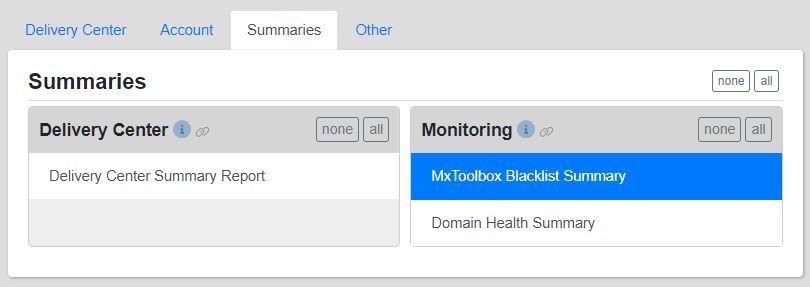
This Notifications section organizes them by type. You can easily set up multiple team members to receive specific emails or view who is currently allowed to receive them. Plus, you can quickly subscribe/unsubscribe certain teammates to various alerts.

On the left side of the interface, each tab (Delivery Center, Account, Summaries, and Other) lists the corresponding categories of those four headers.

For example, the Summaries category shows the Delivery Center and Monitoring types. Under each, their specific notifications are shown.

Assigned Users

On the right side of the page, the Assigned Users for every notification are provided. If you want to see or change who receives the various types of notification, simply select a specific alert and update the user’s access by clicking their corresponding button in the Assigned Users section. Green means that teammate will receive any notifications assigned to them.

Notifications History

The Notifications History page provides a log of all notifications sent to your chosen users, as well as any setting changes that affect notifications. For example, if you want to confirm that an MxToolbox Blacklist Summary report or a Monitoring Alert email was sent to a team member selected to receive those notifications, this interface provides that information. All updates and changes made are conveniently shown here.

Using the shown drop-down menus (Type, Domain, By, For, and Result), you can adjust the data view. These options essentially work as filters.

The table lists different characteristics of every notification for review, including: Date, Topic, Type, Domain, By, For, and Result. They are sortable to give you the desired insight.

Questions?

If you need help setting up any MxToolbox Notifications, our expert Support Team is ready to get you and your colleagues situated. The “Help” tab for each category is also a great reference to utilize. Stay informed and start receiving important MxToolbox alerts and communications in your inboxes today!

Inbox Placement – A New View from MxToolbox

Reaching inboxes has always been essential for your business. If your latest newsletter or campaign lands in the Spam/Junk folder or is never delivered, your email efforts have failed, not to mention the wasted time/resources.

Many of our customers do not realize that they have an email delivery issue until a customer or vendor reports a missing email. There are many subtle reasons why an email can fail to reach the inbox. Getting to the Inbox now requires active management.

A Wider View

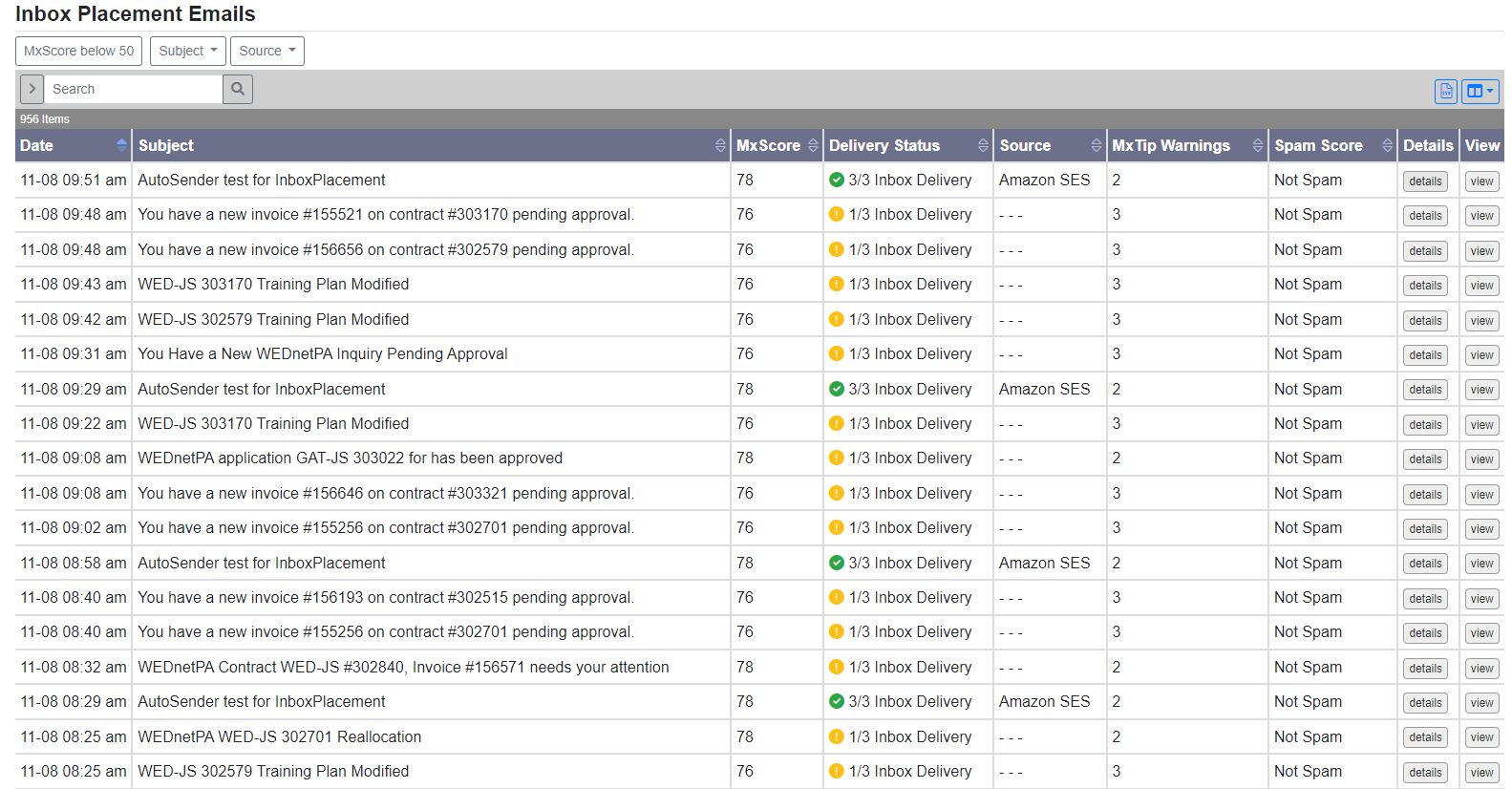
MxToolbox’s Inbox Placement is analysis tool for your campaigns. You email our list of test accounts to see where your outgoing messages will most likely go before you launch your campaigns, whether it fails entirely, makes the Inbox or gets turfed to a Spam/Junk folder. And, if an email falls short of reaching an Inbox Provider (Google, Microsoft, etc.), our service provides insight to help you make necessary changes to improve your results.

Expanded Insights

Our team of Email Delivery Experts have been analyzing the most common reason why emails fail to make the Inbox and developing new ways to surface this information to our customers. The new version of our Inbox Placement tool has some great improvements:

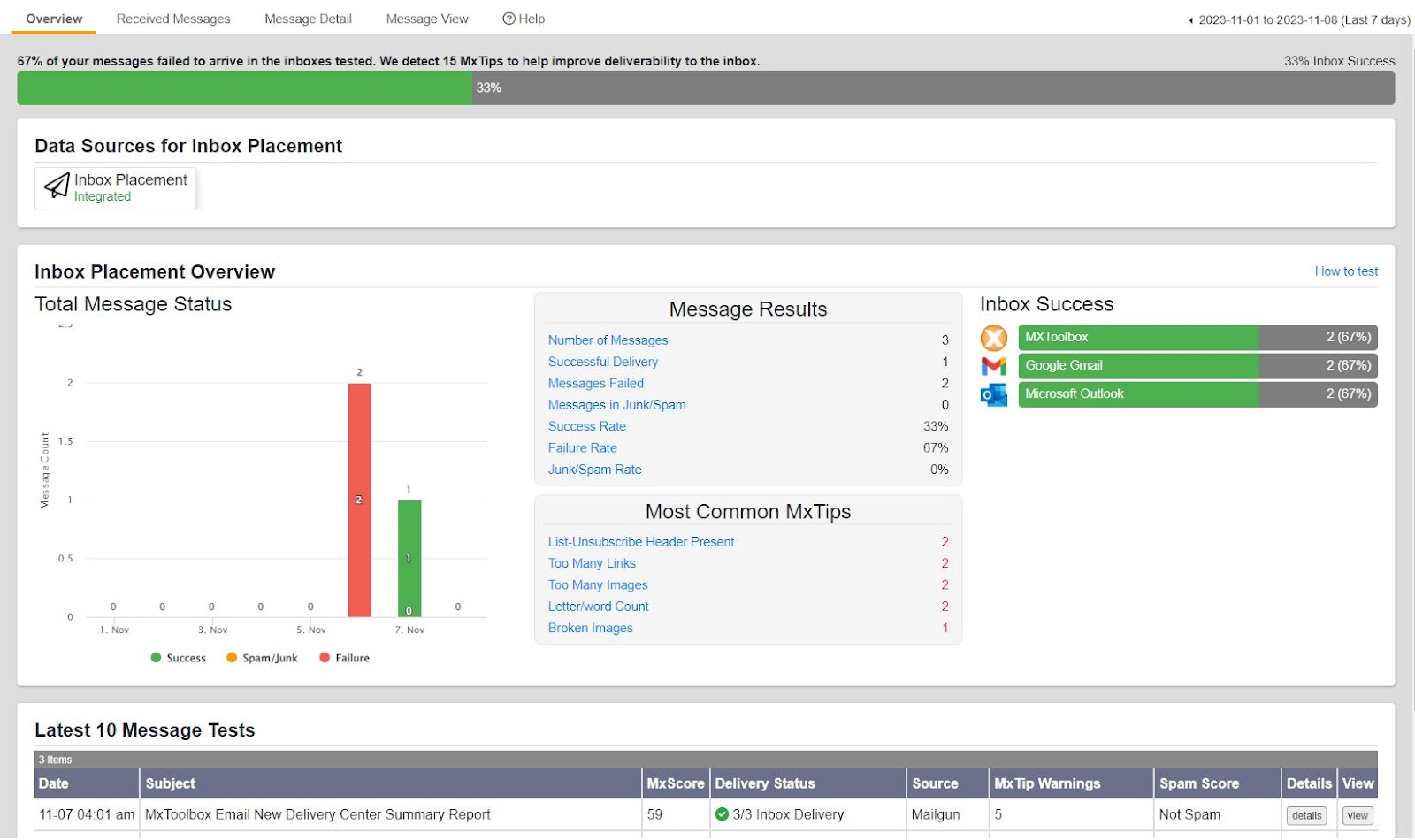
  • New Overview Page: Better summary information of campaigns and inbox placement analytics.
  • New MxTips with MxScore: More analysis tools to help you make the Inbox along with our weighting of importance to help you prioritize changes.
  • MxTips Types: Better insight into which MxTips were tested and their outcomes (Failed, Warning, Success). They include best practices, content, security, and reputation.
  • Email Render: See a copy of the original email for quick analysis and (coming soon) in-render highlighting of the MxTip warnings.

How Does Inbox Placement Work?

With MxToolbox’s Inbox Placement, you get ahead of many unknown email delivery issues and stay out of the dreaded Spam/Junk folder. MxToolbox Inbox Placement gives you two options to test the placement of your emails:

  1. Proactively send emails to our test inboxes – Whether you are crafting a new nurturing campaign or setting up a newsletter, send a test email copying our list of test inboxes. MxToolbox will tell you how the email performs!
  2. Monitor on-going newsletter performance – Subscribe our list of test inboxes to your newsletter lists to continually monitor performance and get warned when your reputation changes with Inbox Providers. Inbox Providers are constantly changing their algorithms to remove irrelevant email. Each time you send an email to these lists, you get insight into how they performed with the major Inbox Providers!

MxToolbox Inbox Placement provides actionable information about your email campaigns, highlights any inbox deliverability issues outlines steps for enhancing your email performance.

How Can I Get Inbox Placement?

MxToolbox Inbox Placement is a feature of MxToolbox Delivery Center. Simply purchase one of our Delivery Center plans and you gain access to Inbox Placement along with our full suite of DMARC email delivery tools.

Business Email Compromise (BEC) Fraud on the Rise

Cybercriminals are a major threat to business email. Through various business email compromise (BEC) scams, these fraudsters can cause irreparable financial and reputational damage to your company. With BEC on the rise, protecting your inbound (and outbound) messages is vital to your company’s success and longevity of its brand.

What Is Business Email Compromise (BEC)?

BEC attacks are financial in nature and target organizations of all sizes. The gist of a BEC scam is a fraudster pretends to be someone at the executive level, then convinces an unsuspecting employee to help them wire funds outside of the company. BEC compromises often use publicly available information, phone calls and emails from domains that are similar in nature to the target company. For example: targeting MxToolbox.com with an email from MxTooŀbox.com. Look closely.

Loss numbers are frequently significant, and it’s a very appealing tactic for scammers looking to get rich quick.

Unreported BEC (Needed?)

Many instances of BEC fraud go unreported because few companies want to admit that they fell victim to a scam. As a result, cases are typically hidden until court proceedings. It’s difficult to gauge how much money is actually lost to BEC scams per year, but the estimates are astronomical.

Common Types of BEC Attacks

According to the FBI, there are five common types of BEC scams:

Email Account Compromise

In an email account compromise attack, an employee’s email account is hacked and used to request payments from vendors. The money is then sent to attacker-controlled bank accounts.

Vendor Email Compromise

Companies with foreign suppliers are common targets of vendor email compromise. Attackers pose as suppliers, request payment for a fake invoice, then transfer the money to a fraudulent account.

CEO Fraud

Scammers impersonate the CEO or executive of a company. As the CEO, they request that an employee within the accounting or finance department transfer funds to an attacker-controlled account.

Lawyer Impersonation

Fraudsters pose as a lawyer or legal representative, often via email. The common targets of these attacks are lower-level employees who might not have the knowledge or experience to question the validity of an urgent legal request.

Data Theft

Data theft attacks typically target HR personnel to obtain personal information about a company’s CEO or other high-ranking executives through emails. The attackers can then use the received data in other future attacks, such as CEO fraud.

Tips to Avoid BEC Scams

Because email is such a critical aspect of your business, a single compromised account is all it takes to financially damage your company and its brand. Here are some tips on how to stay protected and secure:

  • Carefully scrutinize all emails. Be wary of irregular emails that are sent from C-suite executives, as they are used to trick employees into acting with urgency. Review emails that request transfer of funds to determine if the requests are irregular.
  • Educate and train staff. While employees are a company’s biggest asset, they’re also usually its weakest link when it comes to security. Commit to training them according to the company’s best practices. Remind all that adhering to company policies is one thing, but developing good security habits is another.
  • Confirm any changes in vendor payment location by using a secondary sign-off by company personnel.
  • Stay updated on your customers’ habits, including the details and reasons behind payments.
  • Verify requests for transfer of funds when using phone verification as part of two-factor authentication.
  • If you suspect that you’ve been targeted by a BEC email, immediately report the incident to law enforcement or file a complaint.

How Can MxToolbox Help? (DMARC)

DMARC helps secure your company’s email platform and fights to protect against BEC scams. By implementing DMARC checks on inbound email and educating employees, the prevalence of online fraudsters and their BEC cons can be minimized. In addition, Implementing DMARC on outbound email will reduce of your brand being used in a BEC scam, potentially damaging your business reputation.

At MxToolbox, our email experts have created several tools and services to safeguard your business and increase its email deliverability. Check out our various products to help protect your company’s email reputation.

Our Commitment to Free Tools

MxToolbox started out as a simple set of free tools for IT and Email administrators. Most of our customers used our original DNS, MX and Blacklist lookups to verify their website and email setup and understand why email wasn’t going through. Since those days, we’ve committed to continually adding useful free tools to help IT and Email professionals with their daily tasks. From A record (and AAAA record) lookups to Whois Lookup, we have you covered (and if there is a tool we’re missing, we encourage you to let us know).

Not only do we have a comprehensive list of tools, we continue to expand it: when we find a tool we need, we add it to the list. For example, we recently added the:

MTA-STS Lookup: This test checks a domain or hostname for an MTA-Strict Transport Security (MTA-STS) DNS TXT record and also for a valid MTA-STS policy.

Organize your MxToolbox Tools

We understand that not all our tools are for everyone, and that you use different groups of tools for different tasks: email, security, setup, etc. For your convenience, we organized our tools into categories:

  • All Tools: Every available free tool is housed under this tab.
  • Email: For email problems, this tab is your best bet
  • Network: To address potential network issues, try these tools.
  • Website: If you have any website queries, this tab provides answers.
  • DNS: You can find all tools related to DNS here.
  • New: This tab shows the most recent additions to our expanding toolbox.
  • My Favorite Tools: Your customized favorites list. For more information, see the corresponding section below. Learn how to setup your favorites

For a complete list of our free tools, click here. We always enjoy questions/feedback, so let us know about your MxToolbox tools experience. Be sure to use our tools to improve your email delivery rates!

Google and Yahoo are upping their game in 2024!

In the on-going battle against spam, Google and Yahoo have announced new standards for 2024 that will help protect their inboxes and curtail spam intrusions. This is great news for legitimate email senders who abide by email best practices as we expect other Inbox Providers and email services to follow their lead. However, your business may need to adapt to these new standards or risk missing the Inbox.

Google and Yahoo to Require SPF, DKIM, and DMARC

For Google, if your business sends more than 5,000 messages to Gmail addresses, you must adopt SPF, DKIM, and DMARC by February 2024. Yahoo will apply the same trio of requirements to “bulk senders” in the first quarter of 2024, though they have not defined what constitutes a bulk sender.

The new email requirements include both SPF and DKIM records for authenticating email-sending domains, a DMARC record for the domain, and a “From” header that matches either the SPF or DMARC record, known as “alignment.” In addition, marketers must keep spam rates below 0.3% and provide the ability to unsubscribe with a single click if the recipient chooses.

What does this mean for your business?

Google’s and Yahoo’s requirements are a critical move to reinforce your company’s email best practices. With the two largest email providers taking major steps to secure inboxes, more Inbox Providers will adopt similar DMARC policies in the future. Getting prepared will be key.

If your company has already enabled SPF, DKIM and DMARC, you get a boost. Your messages will have to compete with fewer poorly configured emails or spam messages. Your email has protection against impersonation through better authentication and, with DMARC, you are able to see SPF and DKIM configuration issues that would put your email delivery at risk and detect spammers attempting to use your domain for fraud of phishing. If you have not configured SPF, DKIM and DMARC, you have a short window to get prepared. Regardless of your SPF, DKIM and DMARC configuration, however, the requirement to maintain a low rate of being marked as “spam” could really hurt you if you are purchasing email lists.

How Can MxToolbox Help?

With these upcoming changes to Google and Yahoo, now is the perfect time to use our various tools and products to improve your email deliverability!

Since DMARC will soon be a requirement for those providers, MxToolbox Delivery Center will help your sending domain achieve the best possible email delivery rates, including managing your DMARC setup. In addition, our Inbox Placement feature will tell you if your campaigns are being sent to the Spam/Junk folders or actually making it to inboxes, as well as which Inbox Provider(s) you are having trouble sending to.

MxToolbox is the Expert on email delivery. We offer a wide range of free and subscribed options, so be proactive now and take advantage of them before these new 2024 guidelines are applied to your outgoing newsletters and marketing campaigns.
Seriously, Stop Buying Email Lists

In the early days of the Internet, purchasing a list of email addresses was a legitimate business tactic. Lists were a new thing, sending an email was basically free, email servers accepted almost all email and spam was not much of a problem.

Spam Unsolicited email that is sent in bulk.

Let me say this unequivocally, if you purchase and use email lists, You Are A Spammer. Any email sent in bulk that was not opted into by the recipient is considered spam. If you have zero prior contact with this email address, you are spamming it. It does not matter if you have a legitimate business and that you are not trying to scam the recipient, your email is still unwanted. Think of email spam as equivalent to the pile of unwanted ads in your regular mailbox. You didn’t ask for it and it wastes your time and resources to get rid of it.

Inbox Providers Have Ramped Up Spam Defenses

The main goal for Inbox Providers is to protect their users by eliminating irrelevant, unwanted and dangerous emails. Over the last 20 years, Inbox Providers have applied multiple layers of defenses around their inboxes:

  • Checking senders against Blacklists/Blocklists
  • Refusing non-TLS encrypted email
  • Checking SPF, DKIM and DMARC configurations and then bouncing non-compliant email
  • Scanning email attachments for malware
  • Scanning email links for potential malware websites
  • Checking content for known spammy verbiage
  • Deprioritizing email campaigns sent to closed, unused, or non-existent accounts
  • Aggregating sentiment across recipients

Now, using Aggregate Sentiment algorithms and AI, Inbox Providers can detect campaigns that have low relevance, start from purchased lists, or are likely to be marked as spam and drop the entire campaign in the spam folder. Further, some senders dependent on purchased email lists have reported all email from their domain being binned – essentially burning out their sending domain.

What can you do?

The first thing you need to do it stop depending on purchased email lists for prospecting, continuing to do so could burn out your domain reputation. To do this, you need to look at other methods for lead generation:

  • Online advertising
  • Word of mouth
  • Social media advertising
  • Opt-in email newsletters

How can MxToolbox help?

If you have burned out your sending domain, MxToolbox can help you setup a new email sending domain, configure email best practices, etc. however, you must change your email practices or this will happen again. DMARC, and a DMARC management tool like MxToolbox Delivery Center will help your sending domain achieve the best possible email delivery. In addition, our Inbox Placement feature will tell you if your campaigns are being dumped into the spam folder or making it to the Inbox and analyze your email for potential inbox placement issues.

Uncover your Email Problems with our Email Delivery Tools

Email delivery is probably the most important connection between Marketing Art and Information Technology. Whether your email is driving sales, connecting to vendors or simply for internal communications, an email that fails to make the Inbox is a failure of communications that can cost your business.

Email Health

A tool that is often overlooked yet is highly beneficial for your email deliverability is our Email Health Report. This tool executes hundreds of domain/email/network setup tests to ensure all of your systems are online and performing optimally. The report returns results for your domain and highlights critical problem areas that need to be resolved.

  • Get full visibility of your email’s health status in one concise report.
  • Identify every problem facing your email, including blacklist, mail server, web server, and DNS issues.
  • Be proactive about email health and detect any current email issues before they cause email failures.

Major MxToolbox Email Delivery Tools

Email delivery is a constantly changing technology landscape. Inbox providers change policies and technologies to protect their users and spammers change methods to get their unwanted messages read. MxToolbox is the Expert in Email Delivery and provides tools to better help you understand your legitimate email delivery issues.

  • Blocklist (IP or Host): The blocklist check tests a mail server’s IP address against over 100 DNS-based email blocklists.
  • DMARC Delivery Report: This tool creates comprehensive DMARC reports, providing insight into potential issues and any needed changes to your DMARC policy.
  • DMARC Report Analyzer: This option makes DMARC Aggregate XML reports human readable by parsing and aggregating them by IP address into helpful reports.
  • Email Bounceback Analyzer: This analyzer returns details regarding the bounce error, such as the inbox provider, why the message bounced, and additional information to help remedy the issue.
  • MTA-STS Lookup: This test checks a domain or hostname for an MTA-Strict Transport Security (MTA-STS) DNS TXT record and also for a valid MTA-STS policy.
  • Spam Analyzer: This tool uses the SpamAssassin software to analyze your message and return a spam score from over 711 various criteria.

Inbox Placement Analysis

Our Inbox Placement tool analyzes your campaign emails before you send them. We determine if the email will make the inbox at major Inbox Providers like Google, Yahoo! and Outlook.com/Office365. We also analyze important technology and soft factors like:

  • DMARC Compliance
  • Broken or copious links
  • Wordiness
  • Broken or too many images
  • Spammy verbiage
  • Other indicators of spam

Inbox Placement is a feature of all paid Delivery Center plans, so you can test your marketing emails and improve your DMARC compliance all in one place.

Does DMARC and email deliverability seem too complicated?

MxToolbox Experts are here with a Managed Services approach to your email configuration issues.

Validity goes behind a Paywall

Validity recently announced that their Universal Feedback Loop ARF reports were no longer a free service but going to be a paid subscription. They are replacing their individual ARF reports with a free aggregate report today.

What is Validity ARF Reports?

Abuse Reporting Format (ARF) is standard that allows Inbox Providers to provide Feedback or Recipient Complaint information to legitimate email senders. The data contained in a ARF report can be as limited as the subject of the email and number of complaints or may be highly detailed information, like:

  • Date and Time of the Complaint
  • Date and Time of the Email Sent
  • Subject of the email
  • Email Addresses Unsubscribing
  • Email Addresses Complaining
  • Email Addresses Failing
  • Type of Failure or Complaint

However, Validity ARF reports only contain minimally actionable information: Subject, Date and Type of Complaint and email header with obfuscated recipient data.

Who does the change affect?

MxToolbox Delivery Center customers with a Validity Feedback Loop/Complaint integration will lose access to new Validity data on September 22, 2023. MxToolbox is investigating the value of integrating with their free aggregate version of the Universal Feedback Loop systems or terminate the integration with Validity.

Our product team is constantly evaluating the potential for new integrations to ensure that our Recipient Complaints feature provides detailed, actionable insight to our customers. While Validity ARF reports contained some actionable insight when free, the impact when compared to DMARC data and other sources of Feedback Loops will be minor to most customers.

MxToolbox’s Stance

MxToolbox has always been an advocate for improving email delivery and an early adopter of DMARC and Feedback Loop aggregation technology. Feedback Loops were intended to be used to improve the quality of email and reduce the quantity of unwanted email, so, placing Feedback Loop and Complaint information behind a paywall seems like the wrong direction. The additional costs will be especially rough for small-to-medium businesses to bear.

MxToolbox Free Email Delivery Tools

MxToolbox has always been a provider of Free Email Delivery Tools. From our early days Blacklist Lookups and Monitors have been free to use. We continue to expand our suite of free tools to help businesses improve email delivery.

Email Content is King! sort of

The essence of a good email is sending the right message to the right person at the right time. Unfortunately, many email marketers make several common mistakes:

  1. Assuming that Email is Free
  2. Assuming that “Good” content is the same for all recipient personas
  3. Assuming that more content is better

#2 and #3 are understandable. After all, your team might have spent a lot of time and effort to create quality content and you want to get your money’s worth. Reusing content, combining it with other pieces, or calling it out in different ways are marketing best practices. However, there are some other best practices that need to be adopted as well.

Generic is boring

There is an American electronics retailer that emails me several times a week. Unfortunately, the content is often the generic “We have new products!” or “We have a sale!” with a call to action that really means “search on our website (to maybe sorta, kinda see if there is anything relevant to you)”. Why should I bother? It’s lazy, generic marketing that makes me work to find any value in it. It’s a throwback to the Sunday newspaper advertisement circulars that had a little bit on sale for everyone; but that is now obsolete.

If you are sending a generic email like this, stop now. There are better ways to engage potential customers through simple segmentation or self-selected segmentation. For example, this retailer could send out an email by brand (Samsung, Apple, LG, etc), or by category (appliance, PC, mobile, smart tv, etc.), giving the recipient enough information to entice further interaction with their site. While still somewhat generic, it is more targeted and there are is direct value to open it if I resonate with that brand or product. Even better would be a tailored email of new and sale items based on prior browsing and purchase history.

Brevity is the soul of wit

Brevity is also the key to engagement. Do you read long emails from advertisers? Most people don’t. A short, direct email with a clear call to action gets more attention than a lengthy email, no matter how well written. This is easier to accomplish once you stop sending generic emails.

A picture is worth a thousand words…

And, many pictures can be confusing… One or two images per major idea should be sufficient to communicate your brand values and the ideas you need to get across. Just as with brevity in verbiage, more meaningful, connected images make a larger impact.

A broken link goes nowhere

A broken or malformed link also does you no good. Checking the number and endpoints of every link, especially calls-to-action will improve the quality of your email and may potentially save you from looking like spam.

Email Delivery

While these Best Practices are written to improve content to achieve better email performance from a marketing, they will also improve your email delivery. Inbox Providers are attempting to serve users by prioritizing relevant email. Large, generic emails, or emails with many images or links look suspicious. In addition, because these types of emails tend to have poor open rates, they are also more likely to be mistaken for spam.

How can MxToolbox Help?

Our Inbox Placement tool analyzes your campaign emails before you send them. We determine if the email will make the inbox at major Inbox Providers like Google, Yahoo! and Outlook.com/Office365. We also analyze important technology and soft factors like:

  • DMARC Compliance
  • Broken or copious links
  • Wordiness
  • Broken or too many images
  • Spammy verbiage
  • Other indicators of spam

Inbox Placement is a feature of all Delivery Center plans, so you can test your marketing emails and improve your DMARC compliance all in one place.

Does DMARC and email deliverability seem too complicated?

MxToolbox Experts are here with a Managed Services approach to your email configuration issues.