Tag Archives: DMARC

It’s Time for BIMI

For the last few years, we’ve been on the fence about when it would be time to implement BIMI. Often, it seemed like the ability to adopt BIMI would only be there for large companies with substantial email marketing budgets. However, support for both Common Mark Certificates as well as Verified Mark Certificates makes BIMI much more accessible for small and medium businesses. We now think BIMI is ready for everyone!

What is BIMI?

BIMI is a DNS technology that allows you to define a logo to appear next to your email subject lines or next to your messages in major Inbox Providers’ web-based, computer and mobile clients. Essentially, your mail will be branded with your logo giving you more exposure and potentially creating an edge over your competitors.

An example of the MxToolbox Logo displayed next to our email in Google’s web client.

Note: BIMI is different from simply being a GSuite-using company in that your BIMI logo will appear at Yahoo!, Le Post and many other web-based, computer and mobile email clients, not just the Google Inbox.*

How do you adopt BIMI?

To be BIMI compatible, you need to have your email configuration setup properly. Inbox Providers need a level of trust before they will include your logo as it appears to be an endorsement of sorts for your brand.

  • You must adopt DMARC, DKIM and SPF
  • Your email must be DMARC compliant
  • Your DMARC policy must be at 100% Reject
  • Your BIMI record must be setup correctly with a properly formatted SVG file
  • You must have a Common Mark Certificate or Verified Mark Certificate for your logo

How does MxToolbox help?

MxToolbox recently released a comprehensive answer to the issues of BIMI setup, management and maintenance. MxToolbox Delivery Center provides everything you need to:

  • Setup SPF, DKIM and DMARC for your Domain
  • Carefully migrate to a DMARC Reject policy
  • Setup your BIMI record
  • Verify compatibility of your SVG image
  • Monitor your certificates for expiration
  • Manage the on-going changes to the BIMI standard

Learn more on our BIMI feature page.

*A previous version of this blog included Microsoft Outlook.com. At this time, Outlook.com does not support BIMI.

Getting DMARC to Reject

More and more, major Inbox Providers like Google, Yahoo! and Outlook.com are demanding DMARC compliance before allowing email into the Inbox. However, to get the best inbox placement and enable new innovations like BIMI, the policy in your DMARC record must be set to 100% reject.

What is a DMARC policy?

The DMARC policy is a setting in your DMARC record that specifies how a recipient should treat email from your domain that fails DMARC and what percentage of your email should be subjected to that treatment. DMARC policies can take on one of three options:

  • None – Do nothing if the email fails DMARC.
  • Quarantine – Move the email to quarantine for further processing.
  • Reject – Reject the email entirely if it fails DMARC.

A DMARC “reject” policy at 100% shows that you are confident in your email configuration and trust that anything appears to be sent from your domain that fails DMARC is likely junk, spam or phishing. You have done the work, so Google, Yahoo! and Outlook.com are more likely to trust you.

Lower trust levels and lower percentages are available for testing purposes, allowing you to gently move your email to stricter settings without impacting your existing email delivery. Most Inbox Providers will treat as suspect all email from domains with a non-reject DMARC policy and use their own internal processes to filter inbox delivery.

How to Get to “Reject”

Getting to a “reject” DMARC policy at 100% is a fairly straight-forward process of iteration.

  1. Gather a list of all your sending systems and ensure that they are in your SPF records.
  2. Setup DKIM and DKIM records for all your sending systems.
  3. Configure your DMARC record to send DMARC reports to a processing tool like MxToolbox Delivery Center.
  4. Review your DMARC reports for missing senders that fail DMARC (go back to step 1 until you uncover all of your legitimate senders).
  5. Modify your DMARC record to a 10% reject policy.
  6. Review your DMARC reports, Delivery Rates, and Open Rates for issues and analyze for a week or a major newsletter cycle.
  7. When satisfied that email delivery is acceptable, return to the DMARC record, changing your policy to 25%, 50% and, eventually 100% while continuing to review as in step 6.
  8. Maintain your review of your DMARC delivery statistics to ensure new senders aren’t accidentally installed and changes at existing senders are incorporated into your SPF and DKIM records.

Iterate through this process as necessary. While Quarantine is available as a policy, MxToolbox Experts have found that it is preferable to skip using Quarantine. Most major Inbox Providers treat non-compliant email from a domain with a DMARC policy of None or Quarantine the same. Stepping through Quarantine will simply delay getting to your goal.

How does MxToolbox Help?

MxToolbox Delivery Center provides everything you need to manage your DMARC, SPF and DKIM setup, move to a DMARC reject policy and manage the on-going maintenance and analysis of DMARC reports.

Manage SPF Setup

Every system that sends email on behalf of your domain must be in your SPF record for the email to be SPF compliant. Unfortunately, many providers get lazy with how they define the entries they want included in your SPF records, often proscribing large ranges or including macros. Sometimes, multiple systems will include the same ranges (GSuite systems being the most duplicated).

MxToolbox helps you manage this by giving you a list of all your Verified Sources, the ability to instantly manage your SPF record, detect overlapping includes in your SPF record and, even upgrade to SPF Flattening should your record have too many includes.

Hosting Your SPF with MxToolbox

Hosting your SPF record with MxToolbox through our SPF Hosting Integration, will enable you to modify your record and add new senders to your SPF record without having to log in to your DNS host.  Additionally, our system will help you avoid configuration errors and make suggestions as to what senders to include in your SPF record without having to leave your MxToolbox account.

With an MxToolbox hosted SPF record, your business can:

  • View your entire SPF setup on one screen
  • Manage your record through Verified Sources
  • Make changes to ensure your SPF record is correct and valid
  • Manage vendors and update providers
  • Enable automated options that automatically keep your record up to date

More MxToolbox SPF Management

MxToolbox Delivery Center Plus also offers SPF Flattening, which rewrites your SPF record. If you have more than 10 lookups included in your SPF record, the later lookups will not be executed, leaving some of your legitimate email senders to bounce. SPF Flattening helps “iron out” any SPF record issues and instantly creates a new, properly configured record to increase your email delivery rates.

Manage DMARC Setup

Similarly to SPF management, MxToolbox Delivery Center can host your DMARC records, allowing you to quickly and easily manage your DMARC records through the iterative process of implementing a 100% Reject policy.

  • View and Inspect your existing DMARC record for configuration issues
  • Manage changes on-the-fly to your DMARC record
  • Quickly modify your DMARC policy
  • Easily adjust the percentage of email subject to the DMARC policy

With MxToolbox Delivery Center Products, the iterative process of getting to 100% Reject is simple and easy!

Apple to Support BIMI in Native Mail Applications

Apple Mail recently announced BIMI adoption within its email applications in iOS 16 and MacOS Ventura. In September. Apple will become the most recent email client to support BIMI.

Why adopt BIMI?

BIMI gives email recipients more confidence in messages they receive and helps them avoid fraudulent emails by forcing senders to utilize new technologies to make email more secure.

BIMI gives marketers and businesses enhanced branding opportunities by attaching the company’s logo to verified messages in the inbox as a reward for adopting DMARC email security technologies. Your customers will trust your correspondence more and your brand will be enhanced.

What is BIMI?

BIMI, or Brand Indicators for Message Identification, is a DNS-based email technology that allows a company to specify a logo for inbox providers to display in an email client. Email providers, such as Gmail, Yahoo Mail, and now Apple Mail, can show this logo to their users in the subject line of certified messages from the sending company. If you receive a legitimate email from Yahoo!, for example, this logo will appear:

How do I get BIMI?

BIMI requires DMARC. Before you can get your logo displayed in Apple Mail’s inbox, you need to get your email fully DMARC compliant, then apply strict DMARC policies. Becoming DMARC compliant is a process, but it is very beneficial and strongly recommended. You need to know who is sending email on your behalf, ensure they are properly configured with both SPF and DKIM, and regularly monitor DMARC delivery reports to understand DMARC compliance.

Once your verified email sources are fully DMARC compliant, you can start enforcing stricter “Quarantine” or “Reject” policies with your DMARC configuration. Inbox Providers like Yahoo!, Google and now Apple Mail will only attach a BIMI logo to your email if the email is DMARC compliant and you have a “100% Reject policy”.

Need Help with BIMI and DMARC?

Checkout your BIMI configuration

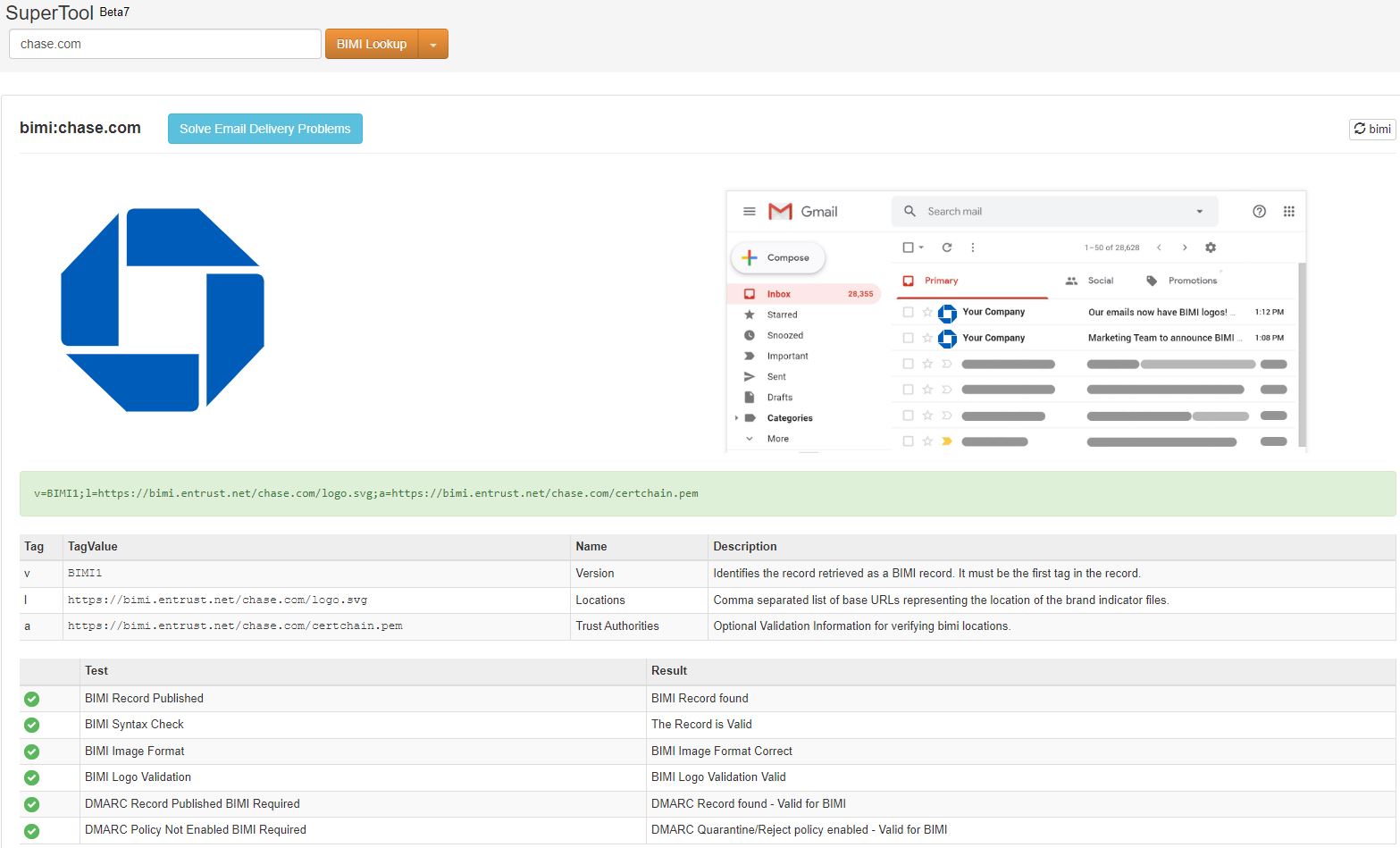
Our free BIMI Lookup tool searches for a BIMI record for any submitted domain name. If a record is found, it is shown in detail after a series of diagnostic checks are performed against the record. For example, below are the results for chase.com.

Get DMARC Compatible!

To maintain the highest levels of email deliverability using DMARC, businesses like yours need a proven Email Delivery management system, such as MxToolbox Delivery Center. Our Delivery Center provides valuable insight into your email delivery status and the continual maintenance necessary to sustain peak performance, including:

  • Manage SPF, DKIM, DMARC, and BIMI to improve compliance and reduce the threat of fraudsters and phishing campaigns using your domain.
  • Review daily volume and SPF, DKIM, and DMARC compliance rates to ensure the best email deliverability.
  • Implement Feedback Loops (FBLs) to gain unique data on how your recipients view your emails and when they mark them as spam.
  • Gradually move your DMARC policy to “Reject” to enable better inbox placement opportunities and reduce the risk of phishing and fraud using your domain.
  • Manage the ongoing requirements of maintaining optimal levels of email deliverability and security.

Want more assistance? MxToolbox has a Managed Services offering to get you DMARC compliant and maintain the highest levels of email delivery.

Google’s Recent SMTP Relay Exploit and DMARC Policies

In April, Google began to see an uptick in spoofing attacks that utilized their SMTP Relay system and compromised Google accounts. They have closed the loophole by May, however, at least 30,000 malicious emails were detected in a two-week period. While this is an extremely small chunk of Google’s email traffic, similar exploits can affect other outbound email providers, requiring patches and constant vigilance.

What is the SMTP Relay exploit?

Google has a great reputation as an outbound sender so email coming from their servers is generally accepted. Google allows their customers to leverage that reputation to send bulk or large quantities of email through the SMTP Relay connection. Before the fix, this enabled any Google customer to send email that looked like another Google customer by simply putting their domain in the “From:” field. For example, SmallCompany.com gets hacked by a scammer and begins to send email that looks like GreatBrand.com, a well respected company also hosted at Google.

  • Blacklists – Google rotates sending IP addresses to minimize the affects of blacklists so a blacklist will not generally catch this issue.
  • SPF Authentication – Both SmallCompany.com and GreatBrand.com have Google’s servers in the SPF record, so it passes Authentication. This might be enough to make the inbox.
  • SPF Alignment – The “From:” address says GreatBrand.com. The <ReturnPath> is SmallCompany.com so it fails SPF Alignment.

So, unless the recipients servers are configured to check SPF Alignment, the Spoofing email may make the inbox. Any brand could then be compromised by a hack to another company in the same outbound email provider.

How do you protect your brand from spoofing?

First, you might think to bring all email in-house. This just compounds your risk. Google and other outbound email providers have more security experts and experience than even most large companies can ever hope to bring to bear. A small or medium business should leverage that experience to protect their brand and get their emails delivered.

Second, adopt DMARC and SPF, and DKIM. A properly configured SPF, DKIM and DMARC setup will help prevent spoofing of your brand and give you insight into potential spoofing issues.

Finally, adopt DMARC “Reject” policies. A DMARC “Reject” policy instructs recipient providers to highly scrutinize in-bound email and reject anything that fails SPF Alignment or Authentication. A “reject” policy would immediately fail email that arrived using the recent SMTP Relay exploit.

Why are few companies adopting “Reject” Policies?

If “reject” policies are great, why aren’t companies adopting them immediately? Unfortunately, there is a lot of fear and misunderstanding about “reject” policies. Our Experts receive push-back every day from our clients. Let’s look at a few examples:

“My legitimate email might be rejected”

While it is possible for legitimate email to be rejected, it is far more likely to be accepted if you have a “reject” policy in place. Inbox providers are looking for relevant content from senders with good reputations. By telling setting up DMARC with a “reject” policy you are telling them that you value your reputation. In addition, the “reject” policy is telling them to throw out emails that might harm your reputation.

“I won’t know if a legitimate source comes online”

Maintaining good email delivery means ensuring that all your legitimate email sources are managed actively. Each source should be included in your SPF record to ensure SPF Authentication. While it is possible for a department to bring in a new 3rd party email source without telling you, these vendors will have detailed information about proper SPF configuration as part of their on-boarding process. If it still slips by, then is it really valid email? Could that rogue department be hurting your brand? Regardless, a comprehensive DMARC reporting tool, like MxToolbox Delivery Center, will alert you that a potential Verified Email Source is missing.

“I won’t know if a phishing attack occurs”

The beauty of DMARC is that by publishing a DMARC record with RUA and RUF tags, you are asking for information about the compliance of emails that come “from” your domain. Inbox providers will tell you through an XML email report. Regular reviews of these reports will give you insight into legitimate sources that fail as well as emerging email threats from phishing attacks using your brand. While you can manually parse these XML files, most companies rely on a reporting tool, like MxToolbox Delivery Center, to process and distill these files into actionable insights.

“It seems complicated…”

While it can take some time to verify your outbound email sources, ensure that SPF and DKIM configurations are correct and monitor DMARC reports to ensure that everything is properly tuned, moving to a “reject” policy is not very complicated. MxToolbox Delivery Center uses our experience with DMARC to make recommendations on when to move to a “quarantine” or “reject” policy and how much of your mail to send under that policy.

If you still find it complicated, you can leverage our Expert Managed Services to help you with your configuration.

What do MxToolbox Experts recommend?

Our team of Experts is always evaluating the newest email technologies – DMARC “reject” policies are a necessity to help improve your brand reputation by stopping phishing attacks using your brand. If more brands adopted DMARC “reject” policies, phishing attacks would be greatly reduced. It’s time for all companies to be DMARC compliant – Get Started Today!