This is the second in our series on making the most of your MxToolbox account.  Today we’ll talk a little about blacklisting. 

Blacklist Lookups

An example of blacklist results.

An example of blacklist results.

Blacklist lookups check our extensive list of blacklists (up to 100 for paid subscribers) and operate in two modes: IP address or Domain blacklists.  This is one of those where checking blacklists for IP addresses produces different results than using a domain.  Read more below.

About Blacklists

For email senders, Blacklists might seem to be a nuisance.  Who are they to prevent you from emailing your customers?  Well, they are legitimately used by nearly every email provider on the internet to reduce spam.  Blacklists setup honeypots that receive spam and use this spam in their algorithms to block illegitimate email.  In fact, Blacklists reduce the amount of email your servers process by as much as 90%.  Think about that for a second…  Your server would need to be 10x more powerful to process all the email you receive without using the email filter capability a blacklist provides.  Blacklists benefit everyone (except the spammers) by reducing the overhead of emailing.

Occasionally, legitimate emailers get caught in a honeypot and added to a blacklists.  That’s how MxToolbox, helping legitimate businesses understand the blacklists they are on and how to get off the list.

IP Blacklists

IP Address blacklists should be checked using the IP address of your mail servers or, in some cases, your web servers.  An IP address on a blacklist indicates that spam or malware has originated from that IP address, or potentially there is an email configuration that promotes spamming or is the source of a botnet attack.  Each blacklist specializes in monitoring different types of bad online behavior (spam, malware, botnets, exploitable email configurations, etc), so check the individual blacklist description for more information.

Domain Blacklists

Domain blacklists are a little different.  A domain blacklist lists domains that have been included in links or content of spam emails or those known to house malicious or exploitative software.  If your domain is on a domain blacklist, chances are your reputation or your website is being used for nefarious purposes and you need to correct it immediately.

Blacklist Detail

If you are blacklisted, MxToolbox is often able to provide information around the blacklist you are on.  This may include your reason for listing.  You will find a DETAIL button for each blacklist upon which you are listed.  For example, CBL is primarily for sending spam, probably resulting from a malware or virus attack.  Now you know what to check your server for before approaching the blacklist for delisting!

Delisting Information
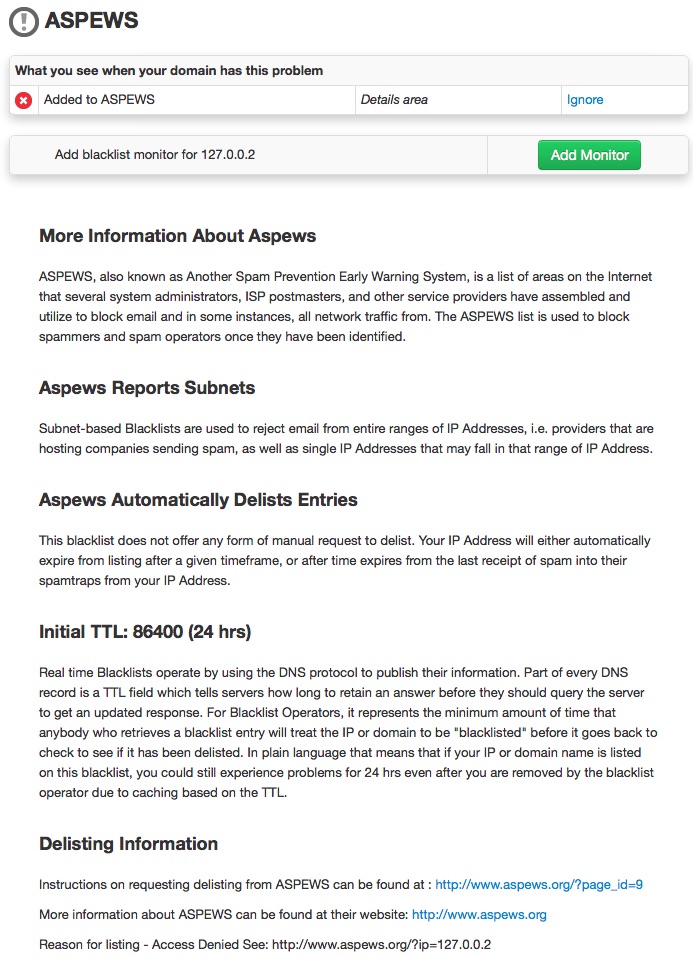
An example of delisting information available on MxToolbox.com

An example of delisting information available on MxToolbox.com

You’re on a blacklist and you want off.  On each blacklist detail page, MxToolbox provides links and steps for delisting your mail servers from the blacklist.  Each blacklist is a little different.  Some may require more information, others may just require you to fill out a request form.  Regardless, you must fix the problem before you request delisting!  If you don’t you will be relisted and most likely have to jump through bigger hoops or experience longer delays the next time you request delisting.

Note:  Some blacklists ask for donations or payments for express delisting.  It is MxToolbox’s belief that delisting should be free.  We only search blacklists that are legitimately used by companies or organizations to reject email and have free delisting.  It is up to you to choose if you would like to pay for an express delisting or donate to the blacklist.  Contact Us is you feel like a blacklist is unfair or unethical.

The next topic is analyzing email server setups and troubleshooting using MxToolbox.
How can I make full use of my MxToolbox account?

MxToolbox has a suite of 30+ tools that makes it easier for IT Professionals and others to do their daily jobs, like setting up and validating email servers, DNS and network configurations or developing and maintaining websites.  With this many tools to choose from, it can be daunting for a new user to get the most out of the site.

This series of posts will give you an idea of the features of MxToolbox and how best to use MxToolbox to go about your daily tasks, including detailed use cases from our experts.  We will add links below as we expand this series.

Today’s topic is Free Accounts

Free Users

First off, most of our tools are free to use. You can use them as much as you’d like and they will still be free.  That’s our culture.  There are a handful of paid tools, mostly for power users in our Professional interface (more about those later).  You can use our free tools whether you decide to register or remain anonymous.  However, registration gives you access to a free monitor, which you might find useful, so we always recommend registering.

Use the Tools

Our tools are concentrated in the following categories to make executing your daily tasks easier.  All of our tools can be accessed from the More Tools page and while our most used tools (described below) can be accessed using the Supertool via a drop-down or command-line style interface.

Running a Lookup

  • Go to the Supertool page
  • Select from drop down the query you would like to run or, optionally, type your query.  For example, you can type “mx:mxtoolbox.com” to run an MX lookup on our domain.

Use the IP address or domain that you are researching.  
Note:  Some queries require either an IP address or domain while a few accept both arguments.  Those with different arguments may have differing results depending on the argument.  Other queries may require a selector.  Check out the help on the lookup page for more information.

Other Parts in this Series

Part 2 – Blacklist Lookups

Part 3 – Email Lookups

Part 4 – DNS Lookups

Part 5 – HTTP/HTTPS or Website Lookups

Part 6 – Domain Health Check

Part 7 – Network Tools

Part 8 – Free Monitors

Part 9 – Paid Subscriptions and Tools

Part 10 – Paid Monitoring

Part 11 – Premium Monitors

Check back to this page as we add new entries around tools and use cases.

The Death of a Blacklist

From time to time a Blacklist will go permanently offline.  Unlike a failed website that often goes down with little or no noise, a blacklist tends to end with a bang.  This was the case with the recent loss of Burn-Tech.   Blacklists typically have many anonymous subscribers using their lists, so there are only a few mechanisms that can be used to let subscribers know the end is near.  Typically, the protocol is to Blacklist the entire Internet.  This may sound extreme, but it is very successful at driving awareness.

For email admins the story is simple

If email admins get a positive blacklisting on their servers, they tend to go look at why the rejection rate for a particular blacklist has spiked.  Once they do visit the blacklist website, they’ll get the complete story and can remove the blacklist from mail filter algorithms pretty easily.  This typically happens within a day or so, but could be delayed over a weekend (as in the case of Burnt-Tech).

The difference is for legitimate emailers

Legitimate emailers subscribe to services like MxToolbox to know when they are at risk of mail rejection due to blacklisting.  When we see an IP on a blacklist, we immediately alert you.  When it happens for all our customers, we look into the blacklist and will suspend the blacklist and try to notify our customers of the change.  While email admins may still block your email while they are removing the failing blacklist from their filters, this is only temporary.  The good news:  you didn’t do anything to get on the blacklist.  It’s safe to ignore the blacklisting event, even though you may experience a few bounce-backs.  Everyone else in the world is experiencing the same bounce-backs as you, but at least you know why!


How reliable is DNS?

DNS is the backbone of the Internet.  It contains all the information to properly route a customer to your site and begin the transaction, when properly configured.  For example:

  • The A record translates your domain, like mxtoolbox.com, to an IP address of the server.
  • The MX record tells your customers’ email servers what IP address to use when sending email.
  • CNAME records associate one domain name with another domain, which can be used to associate one brand with another.
  • SOA specifies what DNS servers are authoritative for a domain

There are many different record types for different purposes, but the beauty of DNS is that it just works.

Until recently…

In May, hackers added a domain to the St Louis Federal Reserve’s research website and setup a clone of the website that was virtually identical to the existing page.  Using this new page, they grabbed a number of logins from unwitting researchers.

In March, hackers targeted 10000+ GoDaddy customers by adding hidden subdomains.  While at the time of the article only a third of the subdomains had been used, it indicates a new type of attack that leverages Small Businesses and their brands for nefarious purposes.

So, what is this attack?

Think of DNS as a phone book for your online presence.  It contains everything a customer needs to find you: your name, address and telephone number.  What if a criminal could call up the Yellow Pages and change your address without you knowing?  Or, change a digit on your phone number?  You might not even notice at first, but new and existing customers might go to the new location or call the new phone number.

What if the criminal made a store front that looked like yours but instead of providing your quality product, the sold cheap knock offs for the same price?  Your brand would suffer and you might go out of business.

Unfortunately, this costs a lot of money and is pretty easy to spot.  However, with DNS, criminals can hack 10000 domains at a single registrar and go undetected.  This type of attack is becoming more common and everyone from a small business to a large enterprise needs to be aware of the possibility that their DNS is at risk.

Monitor your DNS for Changes

MxToolbox recently launched DNS Zone Protect, a monitoring solution for all your DNS, that gives you immediate warning when any change is made to your DNS.  With DNS Zone Protect, you get instant notification of changes to your domain’s DNS.  This new monitor uses AXFR to monitor your domain’s DNS and compares it to previous DNS configurations.  When a change is made, we flag it and notify you.  You get peace of mind knowing that changes to your DNS are being externally monitored by MxToolbox.

DZPStatus


DZPChangeSummary

How Do I Know When My DNS Has Propagated?

Setting up DNS can be difficult.  As it is necessary for the success of your online business, you need reassurance that it has been done correctly and everyone can get access to your new online presence.

MxToolbox can help you check your DNS resolution, check status on your DNS propagation and monitor your DNS for changes.

Check your DNS Resolution

The first step is to test which servers are authoritative DNS and lookup the entries you’ve made for your DNS configuration.  Our Free Tools give you all the lookups you need to check your DNS configuration.

DNS: Check the authoritative DNS server.

A:  Verify the IP address of your hostname.

AAAA: Verify the IPv6 address of your hostname, if you use IPv6.

MX: Verify the IP address of your mail server.

PTR: Verify the reverse DNS is properly configured.

SOA: Verify your start of authority record is properly configured.

MxToolbox SuperTool supports many other DNS lookups, but those above are those you should be checking at minimum.

ipv6-in-mx-records-screenshot

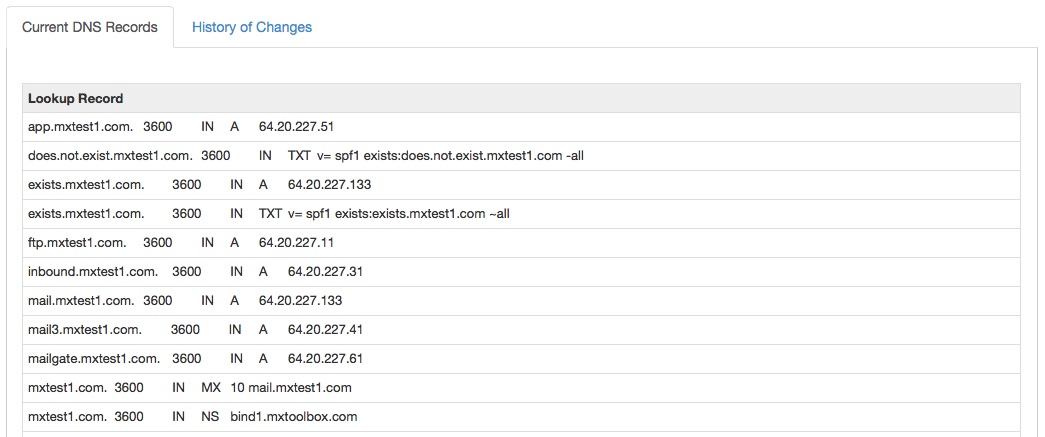
An example MX record using MxToolbox.com

Lookup DNS Propagation Status

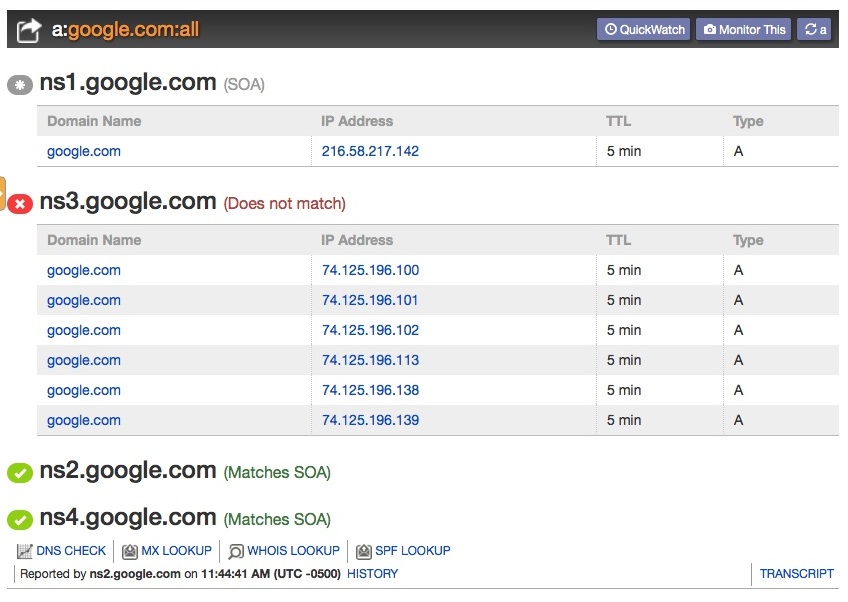
Checking is all of your DNS servers simultaneously is important.  It’s possible that one server may not be properly synced.  Our new, free, DNS Propagation tool checks all of your DNS servers simultaneously when you lookup a record, compares the Start of Authority record to all servers and highlights the server(s) that are different.  In one lookup, you can view the propagation of your records across your entire DNS pool.

dnspropagation

A well-timed search for Google.com’s A record shows them in the process of propagation across servers.

Monitor your DNS for Changes

MxToolbox recently launched DNS Zone Protect, a monitoring solution for all your DNS, that gives you immediate warning when any change is made to your DNS.  With DNS Zone Protect, you get instant notification of changes to your domain’s DNS.  This new monitor uses AXFR to monitor your domain’s DNS and compares it to previous DNS configurations.  When a change is made, we flag it and notify you.  You get peace of mind knowing that changes to your DNS are being externally monitored by MxToolbox.

DZPStatus

DNS Zone Protect provides current DNS status, across the entire domain/zone.


DZPChangeSummary

Changes are easily recognizable with DNS Zone Protect.


How do you API – Real Life Examples, Part 2

Here’s another example from our series on API’s of how one customer is using MxToolbox’s API to simplify their day-to-day work.

The Security Team

Imagine a a security incident:

There are dozens of systems affected.  Each system has dozens of logs containing hundreds of entries for both good traffic and bad traffic.  And you have to sift through it all to find common entries before you can back track it and analyze it.

Wouldn’t it be easier if you had some automated way of doing reverse DNS on IP addresses?  Would your system be faster if you could supply DNS records for domain entries and check IPs for blacklisting to highlight potential bad actors?

That’s exactly what our customer has done.  By integrated Blacklist and DNS lookups with their threat analysis tools, they have dramatically shortened the time it takes to analyze traffic pattern, determine emerging threats and diagnose past issues.

MxToolbox’s API

MxToolbox provides an API to our paid and free customers that allows you to perform lookups, control and poll monitors and check your API status.  Depending on your account, Free, Basic or Pro, you may have different access to Local or Network lookups or access to your monitors.  Many customers use our API on a daily basis to integrate their internal systems with our technology to make the work days easier.  To learn more about the MxToolbox API, click here.

How do you API – Real Life Examples, Part 1

I’ve talked a little bit about API integrations and some questions you should ask yourself before digging in and coding.  Now, I’d like to discuss some unique and interesting examples of how our customers have integrated with MxToolbox to make their daily lives easier.

The Email Service

One of our customers has a consolidated email server management platform for small businesses.  Sold as-a-service, this includes email server status and performance.  As blacklist issues are naturally important as a blocker for email performance and delivery, this company contacted us about using the API to integrate our blacklist lookup technology into their centralized management console.  Now, paid users of MxToolbox can view complete Domain Health information in their mail console, including blacklist information on all their email servers.

The ISP

Another MxToolbox customer is a regional Internet Service Provider with many small online business clients, both web and email hosting.  Because they have a limited IP space, they’re using our Blacklist monitors rather than our Service Provider product for large IP spaces.  Rather than using the API, they utilize our Callback Hooks to connect to their network monitoring servers.  When one of their customers is blacklisted, our monitors call their systems, where they connect it to their customer’s account.  The ISP’s techs then reach out to their customer to notify them of the blacklisting and work with them on security practices that will enable them to stay off of blacklists in the future.  Since websites can be blacklisted due to a hack or malware infection and email servers can be blacklisted for spam, this integration gives them realtime insight into potential security and reputation issues that could affect their entire network.  Further, because incidents are connected to their internet customer management systems, they have a history of which customers are problematic and can work to segregate them from “good” customers.

MxToolbox’s API

MxToolbox provides an API to our paid and free customers that allows you to perform lookups, control and poll monitors and check your API status.  Depending on your account, Free, Basic or Pro, you may have different access to Local or Network lookups or access to your monitors.  Many customers use our API on a daily basis to integrate their internal systems with our technology to make the work days easier.  To learn more about the MxToolbox API, click here.

How do you API? Part, the Second.

In the first post about API’s, I discussed some of the fundamental questions you should ask before investing time in integrating with an API.  I’ll now address a few of the other questions.

Are you ready to scale and maintain?

Undoubtedly, you really want someone to use your tool, widget, app, program or website.  The more the merrier, right?  Unfortunately, you need to consider scalability with your integration.  First, can the API you are using scale with your demand?  Does your provider have the bandwidth or could you quickly become their single largest user?   Can you support adding new features, updating interfaces, etc. when users like your product and want more?

Obviously, if your product is commercial, you’ll have thought about scale, but many don’t think about scale for internal use projects.  I’ve seen a one-off project for a small group turn into a global time keeping product for an entire Fortune 100 company.  You might not need to massively engineer every little product, but it helps to think about how you would if you had the demand.

Are you doing something unique?

Okay, this may seem like a no-brainer, but you have to ask yourself, “Am I really doing something unique?”  Often this is overlooked.  Many people start off making a new app or website in a completely saturated market.  To do something truly unique is rare and often it depends on having unique data you can mashup with other APIs.   What do you bring to the table that is unique for your users?

Is this the only data set, or tool set available?

Again, there are very few truly unique data sets.  Chances are someone half a world away has a similar issues to yours and has done something about it.  If you find a unique dataset, run with it.  But, be aware that if it’s truly unique, you may become dependent on it, creating support, maintenance and scaling issues.  Check out any API you may use to ensure you can depend on it.

MxToolbox’s API

MxToolbox provides an API to our paid and free customers that allows you to perform lookups, control and poll monitors and check your API status.  Depending on your account, Free, Basic or Pro, you may have different access to Local or Network lookups or access to your monitors.  We have many customers using our API on a daily basis to integrate their internal systems with our technology to make the work days easier.  To learn more about the MxToolbox API, click here.

New!

Everything is New!  Okay, not everything but quite a few things…  You might have noticed that in the last 6 months we have added a number of new lookups, monitors and premium monitors.  Here’s a brief list to refresh your memory:

new_prosummary

New features in the Professional interface.

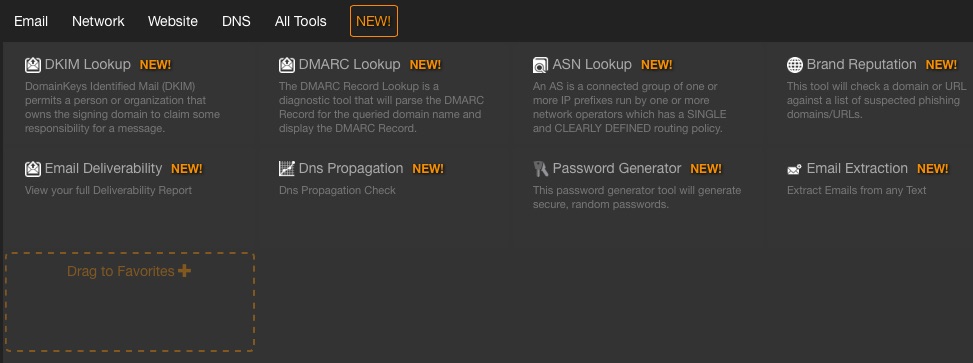
With all the new features, we decided we needed to share the good news.  So, we’ve added a way that everyone can see our new features as we add them.  Clicking on “New!” either on the “More” Tools page or in the Professional interface will give you access to a list of tools we added in the last 90 days.

New features on the More Tools page.

New features on the More Tools page.